AWS account types explained: free tier, pay as you go and credit backed accounts
An AWS account is a billing and isolation boundary, not just a login. Here is what actually differs between a fresh account, an aged one and a credit backed one, and how to pick.
Nearly every AWS question that begins with “why can’t I launch this” comes back to one idea: an AWS account is a billing and isolation boundary, not just a login. Once you see it that way, the AWS account types on offer, from a fresh account to an aged or credit backed one, stop being marketing labels and start being limits you can plan around.
Here is what an account actually contains, what varies between them, and how to work out which one suits the job before you commit a workload to it.
What an AWS account actually is
An account owns resources. Every EC2 instance, S3 bucket, VPC and IAM role belongs to exactly one account, and nothing crosses that line unless you explicitly build a bridge such as a resource policy, a cross account role or a VPC peering connection.
Three things follow from that:
- Billing is per account. One invoice, one payment method, one set of cost allocation tags. Organizations can roll several accounts into a single payer, but the underlying usage is still recorded per account.
- Identity is per account. The root user is created with the account and can never be deleted. Everything else is IAM, and IAM policies are scoped to the account unless you write them otherwise.
- Quotas are mostly per account and per region. This is the part that surprises people. Two accounts on identical pricing can have wildly different launch capacity.
Teams that grow past a handful of engineers usually end up with several accounts rather than one big one: production, staging, sandbox, maybe a security tooling account. That is not overengineering, it is the cheapest blast radius control AWS offers.
The free tier is an allowance, not an account type
People often describe a “free tier account”, but the free tier is really a collection of service level allowances attached to a normal account. Some are time limited from the date the account was created, some are permanently free up to a monthly threshold, and some are short trials of a specific service.
The practical consequences are worth spelling out. Free tier allowances are per account, so creating resources in a second region does not give you a second allowance. They are also silent: nothing stops you from exceeding them, and the overage is billed at standard rates. If you plan to sit inside the free tier, set a budget alert on day one rather than trusting the console to warn you.
We wrote a longer piece on what the AWS free tier covers and where the bill starts if you want the detail.
Pay as you go, and what “aged” really means
A standard pay as you go account bills you monthly for metered usage. There is no commitment and no minimum. What changes over time is trust: AWS raises default quotas as an account demonstrates consistent, paid usage, and quota increase requests on an account with billing history are approved faster and larger than the same request on an account created yesterday.
That is the honest explanation behind account listings that advertise a vCPU figure. An account described as a 32 vCPU account is one whose on demand standard instance quota in at least one region sits at that number, so you can launch that much compute without filing a request and waiting. It is a convenience, not a different product.
Credit backed accounts
Credits are a balance applied against your invoice. AWS issues them through programmes such as Activate for startups, event promotions and negotiated agreements. When an invoice is generated, eligible charges are drawn from the credit balance first.
Three details matter more than the headline number:
- Credits expire. Every credit carries an expiry date, and AWS consumes the soonest expiring eligible credit first.
- Coverage is not universal. Marketplace purchases, some support plan fees, reserved instance upfront payments and certain third party charges are commonly excluded. The exclusion list is attached to the credit itself.
- Credits do not lift quotas. A large balance and a five vCPU limit will coexist quite happily, and the limit is what stops your launch.
Our guide to how cloud credits work covers the same mechanics across AWS, Azure and Google Cloud, including the order in which balances are consumed.
Compute capacity: the quota that bites first
EC2 on demand capacity is limited by vCPU count, grouped by instance family. Standard families such as C, M, R and T share one pool. Accelerated families such as G, P and Inf each have their own, and those are usually far more restricted.
A new account frequently starts in the single digits for standard vCPUs in a given region, which is enough for a couple of small instances and nothing more. If you have ever seen VcpuLimitExceeded while trying to launch something modest, that is the mechanism. There is a full walkthrough in AWS vCPU quotas explained.
AI capacity is a separate conversation
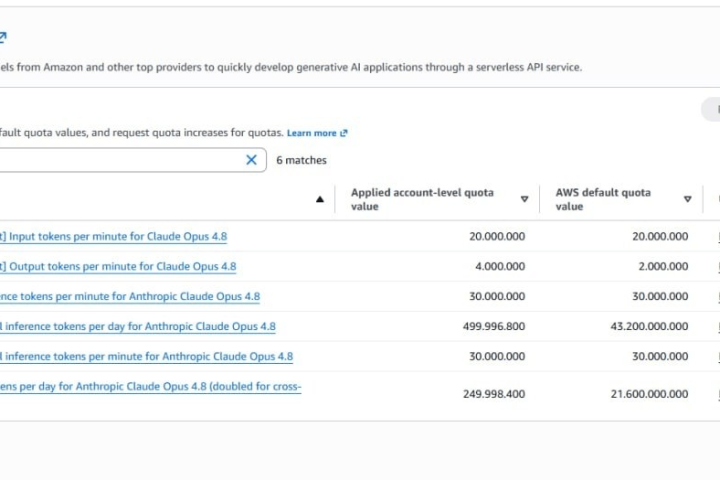
If the workload is model inference rather than servers, the numbers you care about are different again. Amazon Bedrock governs throughput with requests per minute and tokens per minute limits, applied per model and per region, and model access has to be granted before any of it applies. None of that is visible in your EC2 quotas.
We unpack the whole model in Amazon Bedrock explained, including why an account with high RPM on one model may have almost none on another.
Matching AWS account types to the job
A short version of how these map to real work:
- Learning, certification labs, small experiments. A free tier or trial account is enough. You are not going to hit a vCPU wall running a t class instance and a small database.
- A staging environment or a modest production service. Look at accounts with a raised standard vCPU limit, so you can size instances properly without filing a request first.
- Batch work, rendering, CI fleets. Capacity is the whole point. The higher vCPU tiers exist for this, and it is worth checking which region the quota sits in.
- Spend heavy projects with a fixed budget. Credit backed accounts move the cost question, but confirm the expiry date and the exclusion list before you plan around the balance.
- Model inference. Bedrock capacity, not vCPUs. Match the RPM figure to your expected concurrency rather than the compute number.
Before you commit a workload
Whichever account you end up with, the first hour is the same: secure the root user, create an IAM identity for daily work, turn on a billing alert, and check Service Quotas in the region you actually plan to deploy to. That sequence is covered step by step in the first hour in a new AWS account.
If you are still deciding between platforms rather than between account types, the comparison pieces are more useful: AWS vs Azure and AWS vs Google Cloud both put the pricing and networking differences side by side.
Common questions
Is an AWS account the same as an IAM user?
No. The account is the container that owns the resources and receives the bill. IAM users, roles and policies live inside that container and control who may do what within it.
Do AWS credits raise my service quotas?
They do not. Credits only change what you pay. Quotas such as the on demand vCPU limit are managed separately through Service Quotas and are unaffected by a credit balance.
Can one account be used across multiple regions?
Yes, but most quotas are per region. An account with a high vCPU limit in one region may have a very low limit in another until you request an increase there.

AccountMarket Editorial
Written and maintained by the team behind accountmarket.org. We publish practical notes on the cloud platforms we work with every day, and we update articles when the platforms or our catalogue change.
Accounts covered in this article
Live options and pricing from the catalogue.
Buy Amazon AWS Account
Amazon Web Services accounts with preloaded credits and root access, including Bedrock ready options across twenty plan tiers.
From $20.00
Keep reading

Cloud Comparisons
AWS vs Azure: how to actually choose between them
For most organisations this is not a technical decision. Here is what genuinely differs, what does not, and the three questions that usually settle it.
Cloud Comparisons
AWS vs Google Cloud: catalogue depth against a cleaner pricing model
These two differ more than AWS and Azure do. The billing model, the networking design and the data tooling all point in different directions.

AWS
Amazon Bedrock explained: model access, quotas and what RPM really limits
Bedrock throughput is governed by requests and tokens per minute, per model and per region. Here is how those limits interact, and why two accounts with the same plan behave differently.